Stars Without Number Sector Generator: Rolling a Sector and Using It
Short answer
Generating a sector gives you twenty to thirty worlds on a hex grid with tags, populations and seeded hooks, built from the generation tables. Everything is editable, so treat the output as a first draft. The mistake is trying to make all thirty worlds cohere before session one: develop the three or four the party can reach and leave the rest as names.
Stars Without Number Sector Generator: Rolling a Sector and Using It
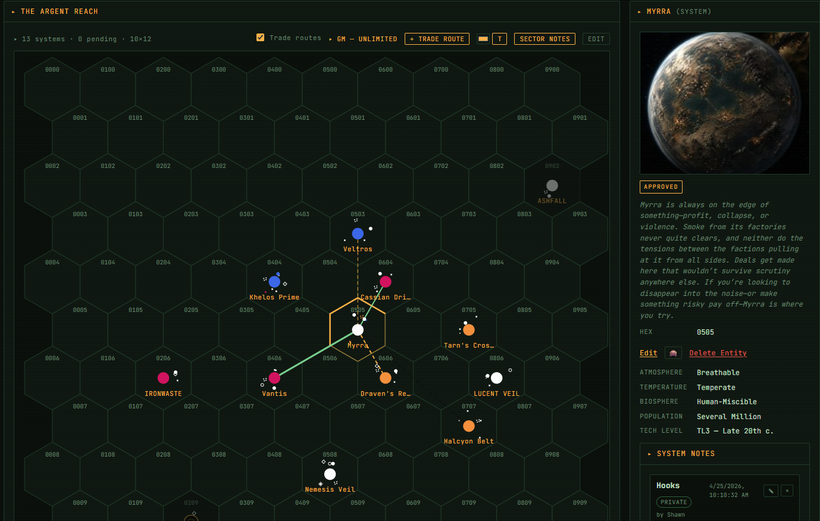
A generated sector is a supply of material, not a document you have to finish. One click gives you twenty to thirty worlds on a hex grid, each with tags, population and basic details, plus a handful of seeded adventure hooks, all rolled off the generation tables and all editable afterwards.
The most common mistake is reading all thirty worlds and trying to make them cohere before session one. Do not. Develop the three or four the party can actually reach and leave the rest as names until someone points a ship at them.
What follows is the mechanics: generating, navigating, adding worlds by hand or on the spot, and what each overlay is for. If you want the argument for running your whole campaign out of the map rather than a prep document, that is a separate guide.
Generating a Sector
From a new campaign, click Generate Sector. The VTT builds a starter sector from the generation tables — stars, worlds, tags, points of interest. You get:
- Twenty to thirty worlds on a hex grid
- Tags, population and basic details on each
- A handful of seeded adventure hooks
Use it as-is or treat it as a first draft. Everything is editable.
A note on generated sectors: the temptation is to read all thirty worlds and try to make them cohere before session one. Don't. Pick the three or four the party can reach, develop those, and leave the rest as names until someone points a ship at them. A generated sector is a supply of material, not a document you have to finish.
Navigating
Drag to pan, scroll to zoom, click a world to open its panel.
The minimap bottom right shows where your viewport sits in the whole sector. Click it to jump.
Adding Worlds
Click an empty hex and choose Add World. Fill the details in by hand, or hit the generator button to roll one on the spot.
Rolling a world live is worth doing in front of players when they go somewhere unplanned. It is faster than improvising from nothing and the results give you something to react to rather than something to invent under pressure.
Factions on the Map
The faction overlay, toggled from the sidebar, shows who is present where. Assets appear as icons on their assigned world, and the whole thing updates as faction turns resolve.
Travel Time
Click any two worlds for the travel time between them, based on hex distance and drive rating.
The reason this is a first-class feature rather than a calculator: in a sandbox, travel time is the main cost the party actually pays. Knowing that a detour costs six days and the thing they're chasing has a head start is what makes a route choice a decision instead of a formality.
Ship Positions
Add the party ship and assign it a world. The icon appears on the map and moves when you update it, so players can see where they are relative to everything else — which is most of what a sector map is for.
Related
The campaign hub guide covers using the map as the place your prep lives. The faction turns guide covers making the political overlay move between sessions.
Related questions
- How do you generate a sector in Stars Without Number?
- From a new campaign, generate one and the tables do the work: stars, worlds, tags, points of interest. You get twenty to thirty worlds on a hex grid with tags, population and basic details, plus a few seeded adventure hooks. Everything is editable afterwards.
- How many worlds should you develop before the first session?
- Three or four. Pick the ones the party can reach and develop those, leaving the rest as names until someone points a ship at them. Trying to make all thirty worlds cohere before session one is the most common way a generated sector turns into homework.
- Can you add a world to a sector mid-session?
- Yes, and it is worth doing in front of players when they go somewhere unplanned. Roll one on the spot rather than improvising from nothing, because the results give you something to react to instead of something to invent under pressure.
- How is travel time calculated between worlds?
- From hex distance and drive rating, shown when you pick any two worlds. It is a first-class feature rather than a calculator because in a sandbox travel time is the main cost the party pays, and it is what turns a route into a real choice.