How to Run a Stars Without Number Sandbox Without Losing Your Prep
Short answer
Store prep on the world it attaches to, not in a document organised by the session you expected to run. When the party ignores your three prepped worlds and jumps somewhere else, per-world notes mean you open a panel and something is there. A linear prep doc gives you nothing, because it was organised around your plan instead of around the world.
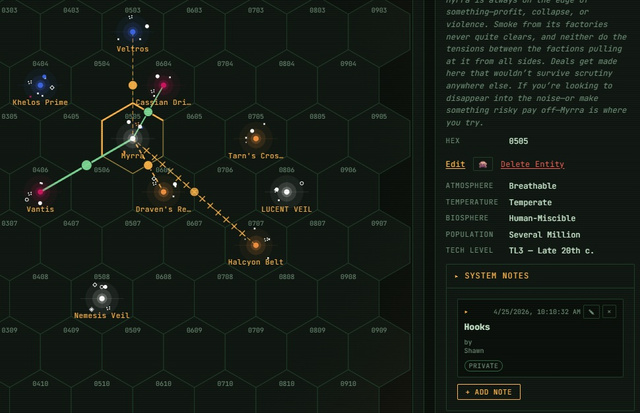
How to Run a Stars Without Number Sandbox Without Losing Your Prep
The failure mode of a sandbox is not running out of ideas. It is that the party ignores the three worlds you prepped and jumps somewhere you had written off, and your notes are useless because they were organised around your plan rather than around the world.
The fix is a filing decision, not a prep technique: put each hook on the world it attaches to, in the map itself, instead of in a document ordered by session. You are writing the hook either way. Only one of the two containers is the thing you will have open at the table. Here is what that looks like in practice, and what else the map should be carrying.
Most sector maps never get used this way. They get generated during setup, screenshotted, pasted into a channel, and then the actual campaign runs out of a document somewhere else.
The Map Is Live
The sector map is not a static image. Faction assets move on it between sessions. Party ship position updates as they travel. World details change inline when play changes them.
That matters less for what it displays and more for what it removes: there is no step where you update the real state and then separately update the picture of the state. The picture is the state.
World Details
Click any world to open its panel:
- World tags
- Population, tech level, atmosphere, biosphere, temperature
- Points of interest you define — cities, ruins, stations, wrecks
- Current faction presence
- Adventure hooks you've noted
All of it is editable mid-session. When players discover something and you want it to be true from now on, write it into the world while they're talking. The alternative is a note in a file you will not open again.
Travel Routes
Draw routes between worlds for known spacelanes, patrol paths, or trade runs. Routes show travel time based on hex distance.
The useful part is not the arithmetic, it's that visible routes make the map a decision. A party looking at three known routes and one unknown gap is being offered a choice. A party told "it takes about a week either way" is not.
The Faction Overlay
Toggle it from the sidebar to see who holds what, colour-coded by faction. Read it once before each session and you will start most sessions knowing what the political situation is, which is the single most common thing GMs lose track of between weeks.
Keep Your Prep In The Panel
This is the whole argument, so it gets its own section.
Put adventure hooks in the Points of Interest field on the world they attach to. Not in a separate prep document. Not in a notes app.
The reason is the moment every GM has had: the party ignores the three worlds you prepped and jumps somewhere you had written off. If your hooks live per-world on the map, you open the panel and something is there. If they live in a linear prep document organised by the session you expected to run, you have nothing, because your notes were organised around your plan rather than around the world.
This costs nothing extra. You're writing the hook either way. It's a question of which container you put it in, and only one of the two containers is the thing you'll have open at the table.
Session Continuity
The map saves automatically after every change. Faction positions, explored worlds, established routes, your notes — all of it is where you left it when everyone logs back in. Nobody has to re-share anything or reconcile two versions.
Related
The sector map tour covers generating a sector and the mechanics of the interface. The faction turns guide covers making the political layer on this map move on its own.
Related questions
- How do you prep for a sandbox campaign in Stars Without Number?
- Attach prep to places rather than to sessions. Put adventure hooks in the points-of-interest field on the world they belong to, so that whichever world the party actually goes to has something waiting. Prep organised by the session you expected to run is worthless the moment the party goes somewhere else.
- Where should you keep campaign notes for a sandbox?
- In the same place you will already have open at the table. If your notes live in a separate app or document, you will not open them mid-session, and the world state and your picture of the world state will drift apart.
- How do you keep track of factions between sessions?
- Use a faction overlay on the map and read it once before each session. Losing track of the political situation between weeks is the single most common thing sandbox GMs report, and a colour-coded view of who holds what fixes it in about thirty seconds.
- Why does travel time matter in a sandbox?
- Travel time is the main cost the party actually pays. Knowing a detour costs six days while the thing they are chasing has a head start turns a route into a decision. Being told it takes about a week either way turns it into a formality.